How to Alter the Form Submission Message
When an Online Form is submitted, the system will show a message to the user to confirm submission. If no message is configured, then the standard "Thankyou, your form has been submitted" message will show. This article show you how to customise this submission message to make it more appropriate for you form.
- Using the menu on the left hand side, click 'Forms home'
- Click 'Manage' next to the form you want to alter.
- Click the 'Build' tab
- on the right hand side you will see the 'Form Settings' Tab. Scroll down until you see the 'Form Submission Message' option
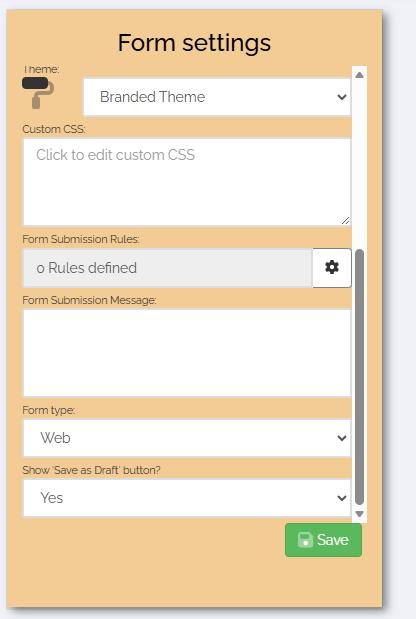
- Click the input box and a window will appear
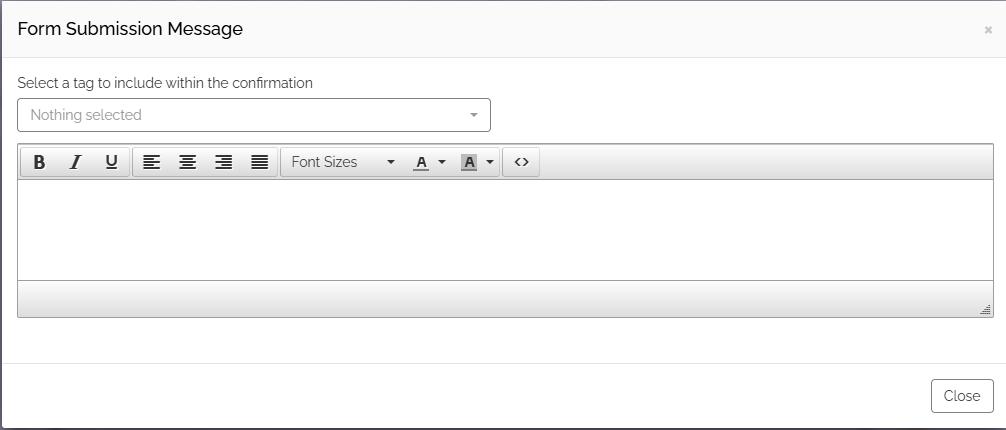
- Type you message in the area provided. You can also include fields from the form submission by using the dropdown above. This will allow you to personalise the message to you user.
- Once complete, click 'Close'
- Click the green 'Save' button
Next time a form is submitted, the new confirmation message will show.